

PassStore app icon

PassStore

by Makio

Developer secrets that never leave your Mac

Native macOS app for API keys, .env groups, and server credentials—open source (MIT). Everything stays on your Mac, secured with Keychain and encryption.

Full source, tests, and Xcode project on GitHub — verify and build it yourself.

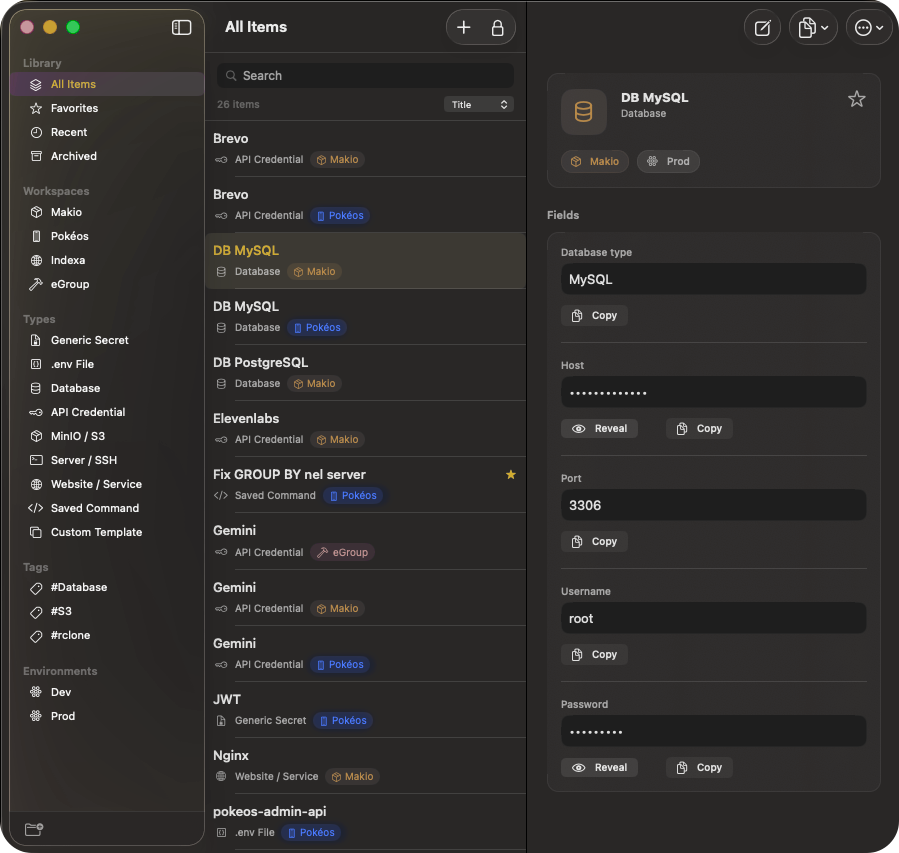
The PassStore window: workspaces in the sidebar, a searchable item list, and a .env item showing its linked file, fields and history

Built for how you actually work

Workspaces, environments, and quick copy—built for daily dev work, with nothing synced to the cloud.

Local-first vault

API keys, database credentials, and .env groups stay on your Mac. No cloud sync, no telemetry, no vendor lock-in — sensitive values in Keychain, not plain text in the database, plus encryption at rest.

  • Keychain-ready
  • AES-256-GCM at rest
  • You own the data
Network activity0 kb/s

Nothing phones home while you work — exports are explicit, under your control.

Native macOS app

Swift and SwiftUI: fast lists, native text fields, and behaviors that feel like real Mac software — not a wrapped web view.

Secrets in Keychain

Sensitive values can live in the Apple Keychain instead of plain-text stores, with the OS handling access and optional biometric gates. Full overview.

Keyboard-first

Command palette, search, and shortcuts so you can jump to a secret, copy a field, and get back to the terminal without reaching for the mouse.

Workspaces and environments

Group items by client or project, tag environments (local, staging, production), and keep exports scoped to the workspace you are in.

Everything included

The whole app, in one list

No paid tier, no add-ons, nothing held back. Every feature below ships in the free app.

Organise

  • Workspaces per client, project or team
  • Environments: local, dev, staging, production
  • Tags, favourites and an archive
  • Built-in types for API keys, databases, SSH, S3, websites and saved commands
  • Custom templates with your own fields
  • Bulk edit across a multi-selection

.env files

  • Import a .env and it becomes a real item, keys and all
  • Keep a link to the file it came from
  • Pull changes back in when the file moves ahead
  • Write your edits out — in place, comments and ordering untouched
  • Told when file and item have both changed, and asked which wins
  • Copy any item as .env, JSON, or a connection string

History and recovery

  • Previous values, so an old password is one click away
  • Up to 10 versions per field, inside the encrypted vault
  • A full change log for every item
  • Undo restores, clears and rollbacks
  • Encrypted .pstore backups, with a preview before they are applied
  • Merge or replace on restore — never silently overwritten

Speed

  • Command palette from anywhere, with a global shortcut
  • Menu bar panel for a quick copy without switching apps
  • Search that matches field values, not just names
  • Copy from the list without opening anything
  • Full keyboard navigation, arrows to Escape
  • Sort by name, last used, last modified or created

Security

  • AES-256-GCM at rest, Argon2id key derivation
  • Touch ID unlock, offered the moment you open the app
  • Auto-lock on idle, sleep, screen lock and screensaver
  • Clipboard clears itself and stays out of Handoff
  • Vault Health finds reused, weak and stale secrets
  • A password generator that respects the classes you pick

Trust

  • Open source under MIT — read every line
  • No account, no telemetry, no cloud sync
  • Signed with a Developer ID and notarized by Apple
  • No Accessibility permission required
  • Sandboxed, with access only to files you pick
  • Your vault is a file you own and can back up yourself

Industry - Standard Encryption

PassStore integrates directly with the macOS Keychain Services API, and leans on the hardware-backed security of your Mac to keep the vault key out of reach. No custom ciphers, no account, nothing to trust but your own machine — and the source is public, so you can check.

AES-256-GCM

Authenticated encryption for data at rest.

Argon2id

Memory-hard key derivation. Resistant to GPU and ASIC brute-force.

Apple Keychain

Vault key stored with biometric access control, device-only.

Atomic writes

The vault is one file, replaced in a single step. An interrupted save cannot corrupt it.

Locks with your Mac

Sleep, screen lock, or screensaver locks the vault. Not just an idle timer.

Clipboard guard

Copied secrets clear after 10 s and are marked concealed, so Handoff skips them.

No Accessibility access

The global shortcut is a registered hotkey. PassStore never observes your keyboard.

Signed and notarized

Developer ID, hardened runtime, notarized by Apple. Updates are verified before they are opened.

Read the full security overview →

/// Secure Enclave Access
let query: [String: Any] = [
kSecClass: kSecClassGenericPassword,
kSecAttrAccount: "api_key_prod",
kSecAttrAccessControl: accessControl,
kSecUseAuthenticationUI: kSecUseAuthenticationUIAllow
]
/// Decrypt with Hardware Key
SecItemCopyMatching(query as CFDictionary, &result)

Ready to secure your stack?

Free for macOS — no subscription. The app is open source on GitHub (MIT); the repository holds the full source, tests, and docs such as SECURITY.md. Read the security overview on this site for how PassStore protects your vault. Optional support on Ko-fi if you want to buy the developer a coffee.

REQUIREMENTS: macOS 26.0 OR LATER · UNIVERSAL BINARY

Frequently asked questions